
A Quick Start Guide to Meta Ads Management for Beginners
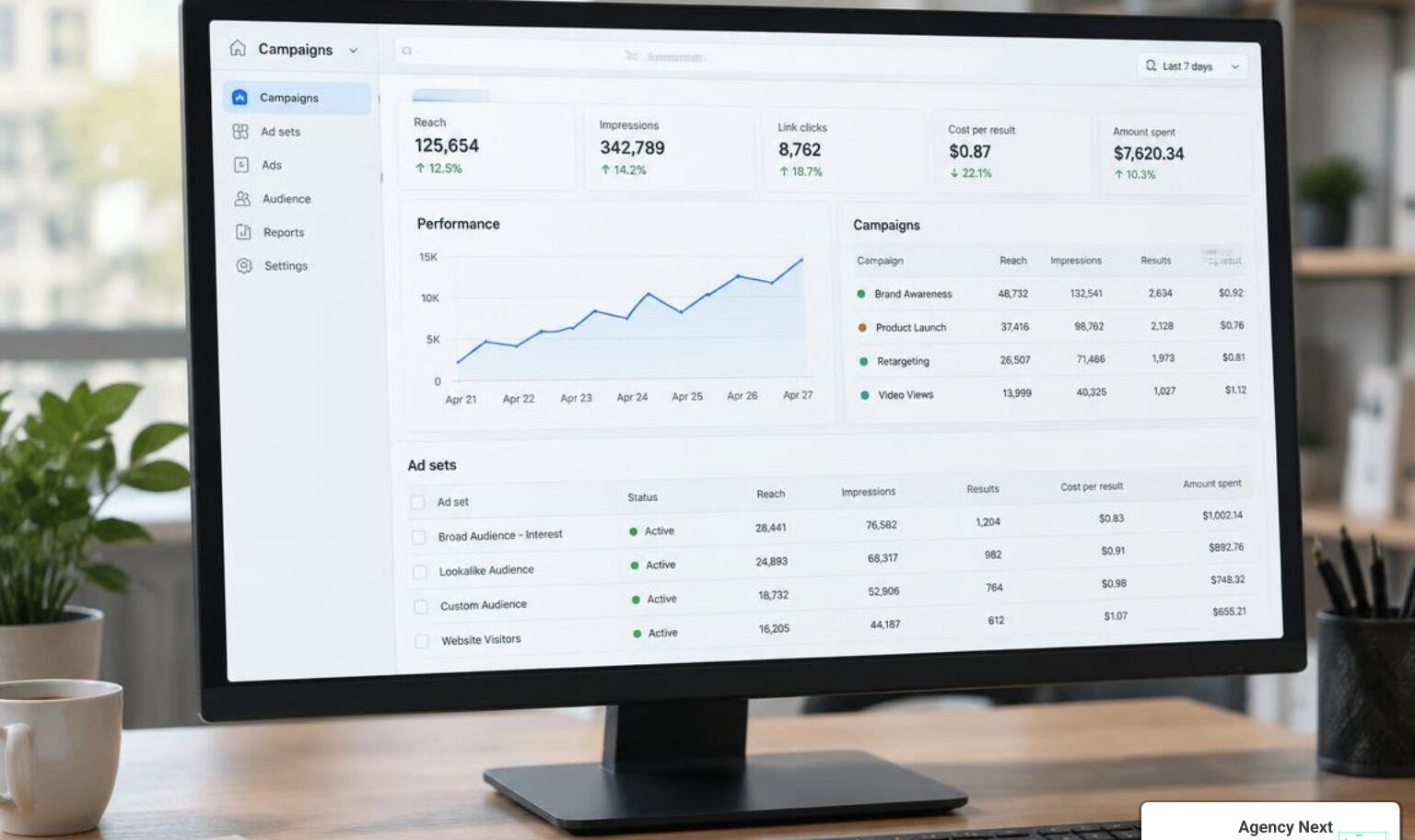
Meta Ads Manager Fundamentals: Moving Beyond the Boost Button
Beginner Meta ads management starts with three practical steps: establish dual-layer tracking through the Meta Pixel and Conversions API, consolidate your account into 1–3 broad ad sets so each can reach roughly 50 optimization events per week, and rotate 3–5 fresh creative variations weekly to avoid ad fatigue. These fundamentals give Meta’s delivery engine the clean data and creative variety it needs to find converting users efficiently.
When many business owners start advertising on Facebook or Instagram, they instinctively click the blue “Boost Post” button directly on their page. It feels fast and easy. However, relying solely on boosted posts is like trying to drive a car without a steering wheel—you have forward momentum, but no granular control over where you actually end up.
Meta Ads Manager serves as the centralized command center that unlocks Meta’s family of apps, spanning Facebook, Instagram, Messenger, and Audience Network. With billions of active users across these platforms, Ads Manager allows you to run sophisticated, multi-platform campaigns from a single dashboard without needing separate tools for each application. It is completely free to use; your investment goes entirely toward the advertising auction.
At the core of Meta Ads Manager is the Total Value auction system. Whenever an ad impression opens up in a user’s feed, Meta evaluates which ad to show using a specific formula:
Total Value = (Advertiser Bid × Estimated Action Rate) + Ad Quality Score
The estimated action rate measures the probability that a specific person will take your desired action (such as submitting a lead form or completing a checkout), while the ad quality score reflects how engaging, relevant, and transparent your creative is. This means that a high-converting, high-quality creative can easily outbid a competitor who simply throws massive budgets at generic campaigns.
| Feature / Capability | Boosted Post | Dedicated Meta Ads Manager |
|---|---|---|
| Primary Goal | Post engagement, likes, basic awareness | Precise conversions, leads, catalog sales, app installs |
| Bidding Control | Automated, simplified delivery | Advanced cost caps, bid strategies, CBO & ABO controls |
| Audience Targeting | Broad interests and basic zip codes | Custom audiences, exclusion lists, lookalikes, broad targeting |
| Placement Selection | Auto-distributed or limited feeds | Granular placement control (Reels, Stories, Feeds, Search) |
| Tracking Depth | Basic clicks and platform reactions | Full server-side CAPI integration and custom event tracking |
| Creative Testing | Single existing organic post | Dynamic creative, multi-format variations, automated enhancements |
Why Dedicated Meta Ads Management Outperforms Boosted Posts
Boosted posts cast a wide, untargeted net that typically generates vanity metrics such as post likes, shares, and superficial video views. In contrast, running structured campaigns inside Ads Manager acts like a precision instrument for driving actual business revenue.
Inside Ads Manager, you gain complete freedom over platform placements, bidding methods, and custom audience exclusions. For instance, you can prevent past customers or recent website converters from seeing introductory ads, saving your ad spend for net-new prospects. This systematic approach is why partnering with a proven digital marketing SEO agency provides an edge: we align full-funnel search intent with paid social acquisition, ensuring every dollar works toward measurable bottom-line growth.
Data Tracking with Meta Pixel and Conversions API
Meta’s machine learning algorithms are only as smart as the conversion data you feed them. If your tracking is incomplete, Meta operates blindly, resulting in higher acquisition costs and poor ad delivery.
To achieve consistent performance, modern advertisers must implement a dual-layer tracking foundation:
- The Meta Pixel: A browser-side tracking script installed on your website to monitor user sessions, page views, and standard conversion events.
- Conversions API (CAPI): A server-side connection that sends conversion events directly from your web server or CRM to Meta’s servers, bypassing ad blockers, cookie restrictions, and browser privacy filters.
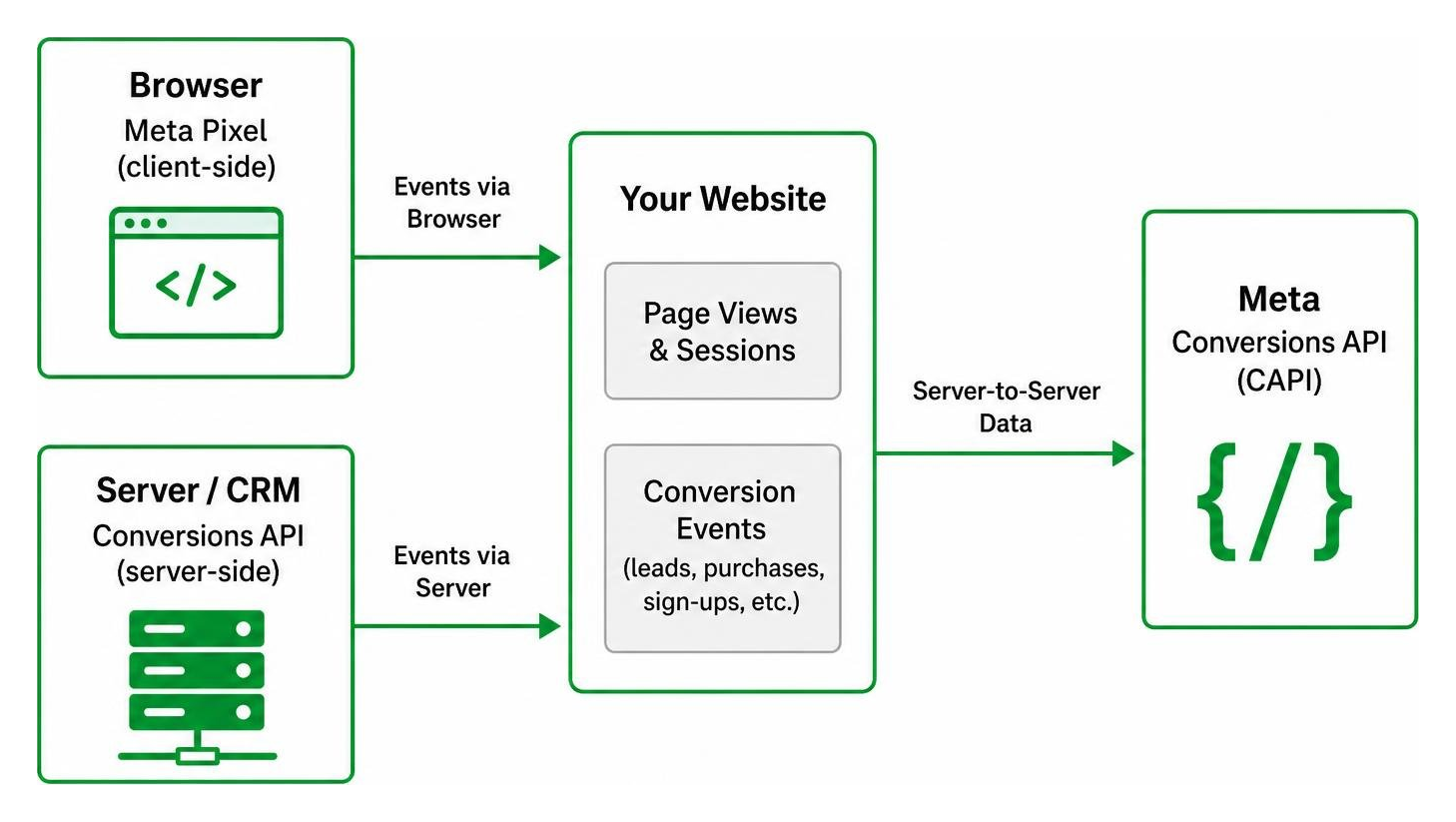
Maintaining high data hygiene directly boosts your Event Match Quality (EMQ) score. When your EMQ score reaches 9.0 or higher, Meta can accurately map purchase and lead actions back to active user profiles. This robust data stream gives the delivery algorithm the clear signals it needs to find higher-value prospects.
Optimal Account Structure and Budget Optimization in 2026
The playbook for setting up Meta ad accounts has evolved dramatically. Years ago, media buyers routinely built dozens of micro-targeted ad sets split by narrow demographic slices or obscure interest categories. In 2026, over-segmentation harms performance because it fragments your budget and prevents Meta’s AI from collecting sufficient data.
Today, successful campaigns rely on consolidated structures paired with high-intent search strategies like our digital agency SEO workflows to build a resilient, cross-channel funnel.
Campaign Hierarchy and Ad Set Consolidation
A high-performing Meta account follows a streamlined 3-tier hierarchy:
- Campaign Level: Defines your business objective (e.g., Sales, Leads, Awareness).
- Ad Set Level: Controls audience location, budget parameters, placements, and conversion goals.
- Ad Level: Houses the visual assets, ad copy, headlines, and destination URLs.
Meta recommends maintaining just 1 to 3 ad sets per campaign using broad targeting. Splitting a budget across too many ad sets starves each one of the data required to optimize delivery.
To exit the initial learning phase and stabilize campaign performance, every ad set needs roughly 50 optimization events per week (such as 50 form submissions or purchases). If you set an ad set budget too low or split it across five ad sets, none of them will reach that 50-event threshold, causing performance to stay volatile and costs to climb.
CBO vs. ABO and Budget Scaling Rules
Choosing how you distribute budget depends on your primary objective:
- Campaign Budget Optimization (CBO): Sets a single budget at the campaign level. Meta’s automated algorithms dynamically shift money to the top-performing ad sets in real time. CBO is the standard choice for scaling proven audiences.
- Ad Set Budget Optimization (ABO): Allocates an exact, rigid budget to individual ad sets. ABO works best for controlled creative testing or running dedicated geographic experiments where you want guaranteed spend distribution.
When scaling a winning campaign, avoid the temptation to double your daily budget overnight. Aggressive budget jumps shock the algorithm and trigger an immediate learning reset. Stick to the 20 percent rule: increase your budget by no more than 15% to 20% every 48 to 72 hours. This gradual adjustment keeps the delivery engine stable while systematically expanding your reach, a method we frequently implement across our recent client work.
Creative Strategy: Combating Ad Fatigue and Driving Conversions
Targeting on Meta has largely automated, meaning your creative is now the primary lever for driving performance. The imagery, messaging, and video hooks you deploy define who stops scrolling, engages, and converts.

Creative Formats and Weekly Supply Cadence
To maintain strong engagement, supply your campaigns with diverse ad formats that cater to different browsing habits:
- Vertical Video Reels & Stories: Authentic, short-form 9:16 videos featuring product demonstrations, customer testimonials, or direct founder walk-throughs.
- Carousel Ads: Multi-card interactive formats ideal for showcasing product collections, multi-step services, or before-and-after transformations.
- Static Single Images: High-contrast, clean graphics that highlight a clear value proposition, discount, or social proof snippet.
Since February 2026, new Sales, Leads, and App Promotion campaigns launch with Advantage+ creative enhancements pre-selected by default. This feature automatically optimizes visual brightness, creates dynamic templates, and adjusts text placement per viewer.
Additionally, compliance is essential: since March 2026, Meta strictly requires advertisers to disclose all AI-generated or AI-modified photorealistic imagery and video. Undisclosed AI content is now one of the leading causes of sudden ad rejections. Aim to introduce 3 to 5 new creative variations weekly to keep your delivery fresh without disrupting active winners.
Detecting Ad Fatigue with Hook Rate and CPMr
Creative fatigue occurs when your audience has seen your ad too many times, leading to disinterest and rising costs. Spot fatigue early by monitoring these key metrics:
- Hook Rate (3-Second Video View Rate): Calculated as (3-Second Video Plays ÷ Total Impressions) × 100. A healthy hook rate hovers between 25% and 35%. If this drops below 15%, your opening visual is no longer grabbing attention.
- Cost Per 1,000 People Reached (CPMr): While standard CPM measures raw impression costs, CPMr evaluates unique reach. A sharp climb in CPMr signals that Meta is struggling to find fresh viewers within your target pool.
- Click-Through Rate (CTR) and Frequency: If ad frequency rises above 3.0 while your link CTR declines steadily over 7 days, your audience is experiencing ad fatigue.
Streamlining Workflows with Modern Meta Ads Management
Managing ad campaigns no longer requires spending hours clicking through repetitive browser tabs. Top growth teams now use automated rules, mobile management tools, and developer-friendly command-line interfaces to run agile operations.
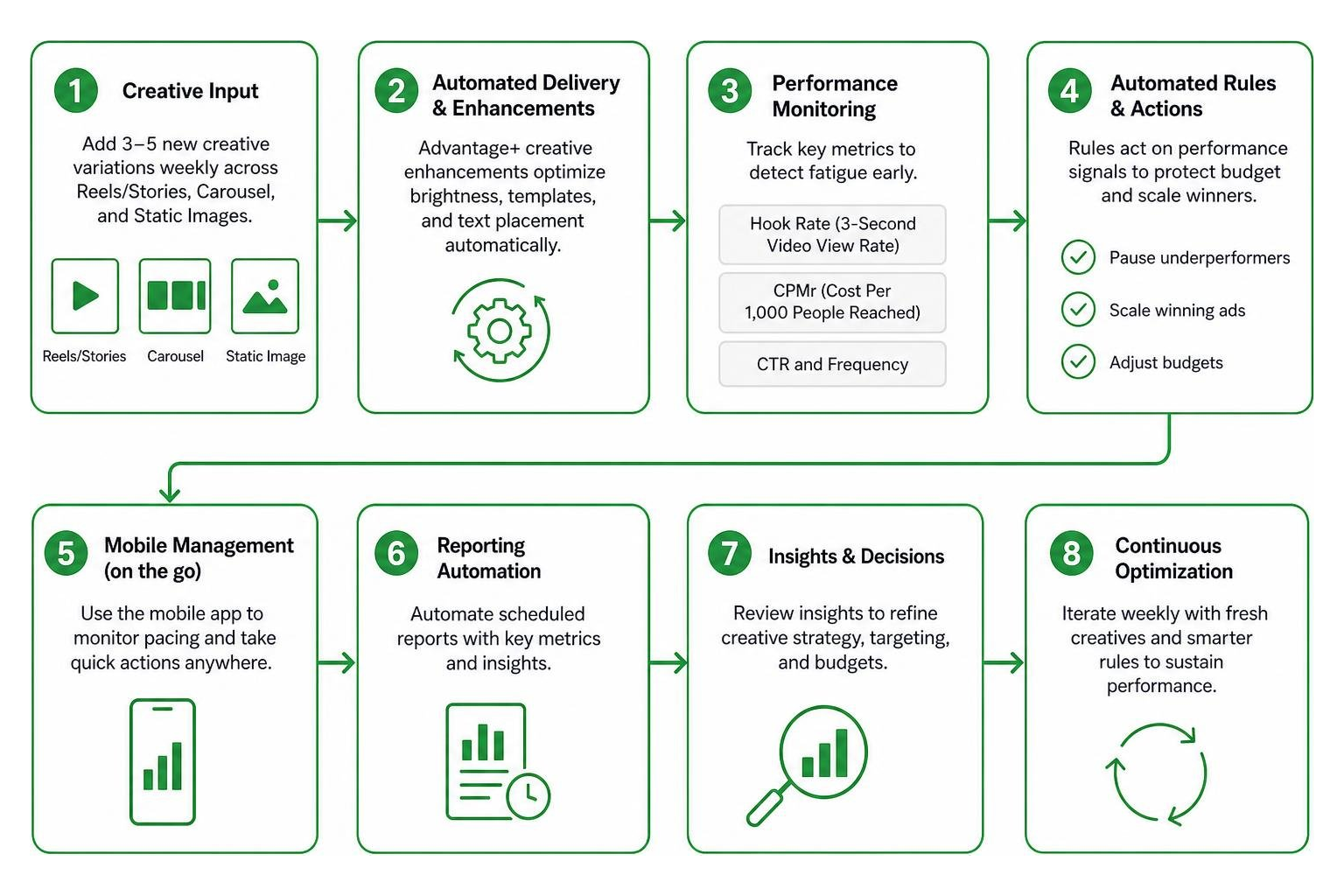
For mobile-first adjustments, the Meta Ads Manager app boasts a 4.5 out of 5 rating across more than 50,000 ratings on the App Store, making it easy to check live pacing and toggle underperforming sets while away from your desk.
Eliminating Costly Errors in Meta Ads Management
Small, impatient tweaks often lead to the most expensive mistakes in advertising:
- The Edit Loop: Making frequent modifications to ad copy, budgets, or targeting settings within a few days of launch. Every significant change resets the learning phase, trapping your campaign in perpetual instability. Give campaigns at least 72 hours of uninterrupted delivery before assessing performance.
- Over-Targeting and Stacking: Combining multiple narrow interest filters reduces audience size unnecessarily, driving up CPMs and limiting delivery.
- Ignoring Weak Signals: Continuing to fund ads that generate high click volumes but zero downstream website conversions or phone inquiries.
AI Copilots, MCP Servers, and Scriptable Workflows
Advanced teams and technical marketers are moving away from manual UI adjustments by adopting scriptable utilities and AI-assisted workflows.
Open-source solutions like the TheMattBerman/meta-ads-kit repository provide community-tested frameworks for running automated daily health checks, flagging fatigue, and recommending budget reallocations directly inside team communication channels.
Similarly, developers can deploy the 0xfabrica/mcp-meta-ads server or utilize the Python-based meta-ads-cli automation package to build programmatic, reproducible deployments. With these CLI tools, you can spin up complete, multi-tiered campaigns from a validated YAML configuration file with a single terminal command:
meta-ads create --config campaign.yaml
These scriptable setups enforce safety guardrails—such as creating new campaigns in a PAUSED state by default and enforcing daily budget caps—ensuring full auditability across all advertising activities.
Frequently Asked Questions About Campaign Optimization
How many ad sets should a beginner campaign have?
For most new accounts and budgets, a campaign should contain between 1 and 3 ad sets. Consolidating your ad sets ensures that all conversion data aggregates in one place, allowing the ad set to reach the required 50 optimization events per week to exit the learning phase and stabilize costs.
What is the edit loop and why is it expensive?
The edit loop happens when an advertiser constantly modifies budgets, audience settings, or ad creative every 24 to 48 hours in reaction to daily metric fluctuations. Major edits reset Meta’s machine learning, forcing the ad set back into the volatile learning phase, burning budget without ever reaching steady delivery.
How do you identify creative fatigue early?
Early creative fatigue shows up before cost per acquisition spikes. Watch for a declining hook rate (the percentage of users watching the first 3 seconds of your video), a steady drop in outbound CTR, and a simultaneous increase in CPMr (cost per 1,000 accounts reached) as ad frequency climbs.
Conclusion
Succeeding on Meta in 2026 comes down to three clear priorities: keeping a consolidated account structure, maintaining reliable server-side tracking, and producing a steady stream of engaging ad creative. When you stop micro-managing targeting and start feeding Meta’s delivery engine clean data and compelling visuals, your campaigns will scale efficiently.
If you are ready to take your advertising performance further, integrate your paid social roadmap with our conversion-focused digital marketing services to build a scalable, predictable customer acquisition engine for your business.